Daksh Pandey
Apple’s forthcoming iOS 26.3, which has been spotted in early beta releases, seems to be introducing a new Settings toggle with the name ‘Notification Forwarding.’ This new feature would supposedly allow iPhone owners to forward receiving notifications to another device, especially third-party wearables like smartwatches that aren’t from Apple. This article aims to provide an elaborate description of this new ‘Notification Forwarding’ feature to understand better its significance and implications on Apple enthusiasts and wearables like Apple-Watch, third-party wearables, and Apple’s overall ecosystem.
1) What Notification Forwarding in iOS 26.3 actually entails
Up until now, the notifications of the iPhone worked perfectly within the universe of the Apple ecosystem: iPhone → Apple Watch, iPhone → Mac, iPhone → iPad, and so forth. For third-party devices (such as Garmin, Fitbit, WearOS watches connected with an iPhone, and more), there are restricted or “best effort” notifications.
Notification Forwarding on iOS 26.3: This has been observed to be a specific system control for forwarding the very same notifications your iPhone receives to another device or even the third-party wearable you own without solely relying on the workaround the device manufacturer provided before.
The big idea is this:
Your iPhone is still getting notifications as usual.
The iOS implementation introduces a new “pipeline” for delivering notifications to a specified device.
That portable device is able to display the notification on your wrist (or other screen) regardless if it is not an Apple Watch.
This explains why you see “forward alerts to other devices” and “third-party wearables.”
2) Where you’ll find it in Settings (reported UI path)
Reports claim that Apple is going to introduce a new entry in Notifications settings:
Settings > Notifications > Notification Forwarding
Essentially, this is not an app-specific setting, such as “Allow Notifications.” This is an application of the top-tier system behavior preference, and this gives the impression that Apple is giving this the consideration of an interoperability function.
I would anticipate the following information would be included on
A switch used for enabling or disabling forwarding
List of eligible devices (“paired” accessories)
A selector to pick a device to forward notifications
3) The most important limitation: one device at a time (and the Apple Watch trade-off)
Among the widely circulated details is the “single device per time” restriction. What good does that do? Essentially, it means that iOS will allow users to forward notifications from one third-party device only.
Most importantly, even more so: if you turn on Notification Forwarding to a third-party watch, your Apple Watch might no longer receive notifications from your iPhone, as iOS cannot “mirror” to more than one wearable under this scenario, it’s reported.
Why would the company, Apple, create that?
Technically, it simplifies copying rules (to avoid double buzzing on two wrists).
Strategically, it restrains how ‘equal’ third-party wearables can be to Apple Watch.
It also shrinks the privacy/security surface area; just one forwarding endpoint is easier to control than multiple ones.
It presents the user with the obvious choice:
For integration with Apple Watch:
Keep the existing Apple Watch notification path.
Really want a non-Apple device to be treated like a first-class citizen for getting notifications? Enable Notification Forwarding and select that device instead.
4) Why Apple is adding this now: EU interoperability pressure
“One of the key contexts that has emerged in the coverage is regulatory pressure within the EU, especially regarding granting third-party devices equal access to system functionality.” It has also been noted that “Some publications have linked Notification Forwarding to the topic of interoperability and the regulatory pressure that Apple is under regarding its control of the platform.”
Translation: “What regulators want is for iPhone consumers to be able to pick and choose accessories (such as smartwatches) without giving up core functionality (such as notifications), for example. Apple’s historic view has been that high integration is only possible if the two parties have ‘deep trust,’ and that is easier within their own ecosystem.”
Apple’s argument being rejected by regulators when it’s used for competitive advantage is that high integration is only possible if the two parties have “deep trust.”
But there is even one report that points out an important detail: the capability can be “EU only” in reality, even though the menu looks more comprehensive. This is the spirit of “present everywhere, active only where required” that Apple has already employed in the past.
So if you are in India, you might see mentions of the location as part of the beta story cycle, but it will depend upon Apple’s final releases as to if and how it will function for your region.
5) What types of notifications might be sent?
Passing messages, theoretically, could be anything that looked like a normal notification notification:
Messages alert (SMS, iMessage)
WhatsApp/Timeline notifications (as alerts, and not full chat sync)
Email alerts
Reminders on calendar
Banking and OTP alerts (Highly Sensitive)
Notifications on delivery/ride apps
Health Alerts (a/k/a Sensitive
However, the specific information being passed is very important. This may include the following in the notification:
“Sender name”
Messaging preview text
SMS Codes
Subject lines
Action buttons (Reply, Mark as Read, etc.)
Due to this, Apple is likely to impose policies for protecting user privacy (see below) and third-party manufacturers may be provided access to a subset of functionalities at first.
6) Privacy and security: the biggest real-world concern
“The concept of notification forwarding is more than just a convenient functionality; it is essentially a managed data sharing process,”
A notice may disclose:
who contacted you,
when
What they said (if there are previews),
sometimes personal or medical information,
and time-based patterns about your life.
This is why the reporting on the feature is also commenting on the sensitivity of the notification data and what happens when data from other companies’ devices is allowed to access it.
Most Probably Used Privacy Policies by Apple Technologies
Even before Apple makes their whitepaper publicly available, we can already assume that the iOS will make use of existing systems:
Notification previews setting
“iOS currently allows you to set the following previews for mail attachments:
Always
When Unlocked
Never
If your previews are “When Unlocked,” your wearable display could say “1 new message” and not display the text of the message.
Notifications by app
If an application does not display notifications on an iPhone, it shall not be escalated.
Since the resulting trust arises from the parties
Only paired, verified devices should be shown as forwarding destinations.
End-to-end encryption
‘’Apple may need secure channels for forwarding (encrypted transport, perhaps with device attestation).’’
Fortunately, there are some things users should do to maintain their safety while
If you ever enable Notification Forwarding:
Disable lock screen previews (or set them to “When Unlocked”) if you are receiving OTPs or bank alerts.
Use passcode protection if available on the wearable device.
Refrain from forwarding to devices that you share with others.
Make it a point to check which is the device chosen as a forwarding end-point periodically.
7) Why third-party wearables matter so much
Historically speaking, non-Apple smartwatches have fared poorly on iPhones compared to Android devices. Some common problems reported by iPhone users are:
delayed notifications,
missing notifications,
limited interactions (cannot respond or dismiss reliably),
reliability problems, which differ for each app.
But if Apple offers the “forwarding pipe” through its own services, it may ease the problem somewhat and help to ensure a stable experience for the user—dependent on how open they are to the process.
Who Benefits?
Those who like Garmin/Fitbit regarding fitness & battery life
Users who wish to use one watch with Android smartphones and iPhone
Enterprise users with specialized wearables
A person who doesn’t own an Apple Watch but would like notifications on their wrist
8) To the Users of the Apple Watch
If true regarding the “one device only” restriction, consumers who buy the Apple Watch are facing the following tradeoff:
If you opt for the Apple Watch: you get to keep the overall experience of the Apple Watch Ecosystem.
If you select third-party forwarding: Apple Watch notification mirroring may not be available while this feature is on.
This may be important if:
use the Apple Watch for quick replies,
use Focus mode syncing,
“rely on Apple Watch’s notification triage,”
or apps on watchOS that have strong links to iPhone notifications.
Breakdown:
Notification Forwarding appears to be Apple allowing third-party wearable device manufacturers a way, or “on-ramp,” onto the playing field, but it does not seem like making the third-party wearable devices the
9) As to how it could function in practical life
Example A: You have a Garmin, not an Apple watch
You turn on Notification Forwarding and choose the Garmin. Then, whenever there are WhatsApp notifications, these notifications appear consistently on the wrist (or at least, if Apple allows this and you can see them that way). The notifications remain controlled from the iPhone, but the wrist device is more helpful.
Example B: You own both an Apple watch and a third-party sports watch
These days, you can wear an Apple Watch for smart abilities and a sport watch for extended exercise activity. You were also able to set one of them to use “as your notification device” by using iOS 26.3 and choosing one of them for that purpose:
during office hours, choose Apple Watch,
During long runs, pick the sports watch,
but perhaps you might have to switch manually within Settings.
Example C: You’re concerned about OTPs and bank alerts
“You enable forwarding, and set the previews to “When Unlocked” or “Never,” and this means the wearable device buzzes but doesn’t show the sensitive information.”
10) iOS 26.3 – is it solely Notification Forwarding?
Several reports have noted that the iOS version 26.3 is a beta release that also contains other changes, including those concerning “tools for a change in ecosystems, such as transfer and migration tool improvements.” However, the key feature is the Notification Forwarding feature, as it is close to the boundary lines drawn by the walled garden of Apple itself.
Also, early betas may evolve because:
features may be refied,
restricted by region,
postponed until later point releases,
or shipped with limitations and expanded later.
11) When is iOS 26.3 coming out
While the public releases are color-coded, they are “expected” and not yet official, with word from Apple already releasing the developer beta version, and iOS 26.3 rumored to be a point release after iOS 26.2, expected to be released in the early year of 2026, subject to Apple’s release schedule.
12) What to look out for next (The real details that will determine whether or not it’s amazing)
With more beta releases, these are the details that will ultimately uncover the true scope of the feature:
Regional availability
Rollout only within the EU, rollout worldwide
What devices qualify?
“Only ‘smart
Any Bluetooth device that comes with its app?
Apple’s “third-party device” is defined by
Notice message depth
Preview options: full previews vs “You have a notification” notifications
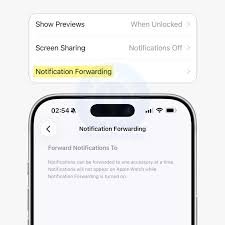
Image support, OTP, notifications Interactivity Can you dismiss from the wearable and sync dismissal back to iPhone? Can you respond (probably very limited at first)? Battery and performance issues
In the wake Constant forwarding might increase background activity. User controls For forwarding, an allow list per app would be the best (e.g. to forward calls and messages, but not bank messages). 13) Bottom line: why this matters Notification Forwarding in iOS 26.3 is significant because it represents Apple’s clear statement that it is at least partially opening up a fundamental iPhone experience, notifications, to non-Apple hardware in a manner that is definitely beyond simple convenience toggles. Such a change is definitely a result of interoperability pressure and will significantly impact user choice in wearables. 9 +3 MacR -3 *The Verge +3 If done well by Apple—very private, easy to use, and delivering well—it could make iPhones more welcoming to third-party watches without surrendering the best of the Apple Watch experience. If very restricted (EU only, not much to transfer, one device limit, limited interaction), it’s still an important precedent but not as earth-shattering in practice.