Daksh Pandey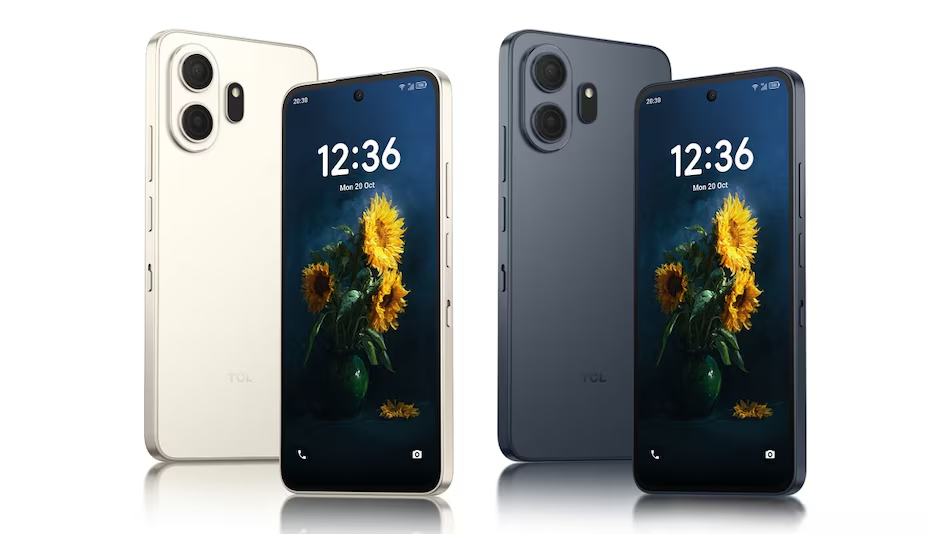
The TCL Nxtpaper 70 Pro is a cool Android phone that was shown off at CES 2026. This phone is special because it has a nice display that looks like paper. TCL calls this the Nxtpaper display. It is now, in its fourth version. The phone also has a button called the Nxtpaper key that you can press to change the way you read things on the phone. You can even use a pen with the phone if you want to. This pen is called the T-Pen. It can tell how hard you are pressing on the screen. The TCL Nxtpaper 70 Pro is a -range phone, which means it is not too expensive and not too cheap. It’s focused at people who read a lot on their phone, want better eye comfort, and want handwriting/note-taking features without buying a separate e-ink device. Retail starting price is roughly €339 / $339 and TCL says it will be available from February 2026 in select markets.
The 70 Pro will be compared to similar devices to see how it stacks up. I will make a list of the things and the bad things about the 70 Pro for different types of users.
Finally I will give you my opinion about the 70 Pro and some advice, on whether or not you should buy it.
1) So what did TCL announce I mean the thing that TCL announced which is basically what TCL is trying to say in a really short way you know, the main point that TCL wants us to know.
TCL showed the Nxtpaper 70 Pro at CES 2026 as the phone, in its Nxtpaper product line. The main features of the Nxtpaper 70 Pro are:
NXTPAPER 4.0 display — a matte, anti-glare, paper-like LCD stack with multiple “paper” modes designed to reduce eye strain and simulate reading on paper.
Dedicated Nxtpaper key — a physical control to switch instantly between Color Paper Mode, Ink Paper Mode, and Max Ink Mode (full monochrome).
Stylus support (T-Pen) — optional low-latency, pressure-sensitive stylus with handwriting/AI note features.
Midrange hardware — MediaTek Dimensity 7300 (reported), 6.9-inch FHD+ 120 Hz display, 8GB RAM variants, 5,200 mAh battery and 33W charging, IP68 rating, and a 50MP main camera with OIS on the rear.
Price & availability — starting around €339 / $339; expected global roll-out from February 2026 (availability varies by region).
The 70 Pro is not really about showing off how great it can be. It is more about being a phone for people who read a lot like students or those who take notes all the time. It is also for anyone who wants a phone that’s easy on the eyes. The 70 Pro is a choice, for heavy readers and people who want to use their phone without straining their eyes.
2) Let us talk about the NXTPAPER 4.0 display. What is new about the NXTPAPER 4.0 display. Why is the NXTPAPER 4.0 display important. The NXTPAPER 4.0 display has some changes. We want to know what these changes are and why the NXTPAPER 4.0 display is useful. The NXTPAPER 4.0 display is something that people’re interested, in. We will look at the NXTPAPER 4.0 display. See what it can do.
The TCL company has something called NXTPAPER technology. This is a way of making screens. It has layers to help cut down on reflections and the blue light that people think is bad for them. It also makes the screen look like paper. This means that when you read on it for a time your eyes do not get as tired as they would on a shiny OLED or LCD screen. The NXTPAPER technology from TCL is really good, for people who like to read a lot on their devices.
So what does the NXTPAPER 4.0 bring to the table. The NXTPAPER 4.0 brings a lot of things.
* The NXTPAPER 4.0 brings features
* The NXTPAPER 4.0 brings improvements
The NXTPAPER 4.0 brings all these things to make it better.
The new screen has a layer that helps with glare and it is also matte. This makes the words on the screen really stand out and it cuts down on reflections. The anti-glare and matte layering on the screen are really good, for reading text because they increase the contrast.
The device has display modes. These modes change the way colors look and how the user interface works. This is done to help you read things easily or to make the battery last longer. The display modes do this by changing color rendering and the UI treatment to emphasize reading or maximize battery life of the device.
A “Max Ink Mode” that approaches an E-Ink-style monochrome look — this can dramatically reduce power usage for reading tasks and remove visual distractions (icons, animations). TCL has applied a two-stage/slider control called the Nxtpaper key so users can flip modes instantly.
Practical implications:
Reading comfort: users report less glare and easier reading in bright conditions (sunlight), compared with glossy screens. The matte surface diffuses reflections and the hardware filters some blue light before it reaches the eye. This is particularly helpful for people who read PDFs, e-books, or long articles on mobile.
Color vs ink tradeoff: the display still supports full color and a high refresh rate (120 Hz) for apps and video, but switching to paper/ink modes prioritizes contrast and battery. The best of both worlds is possible because it’s not a permanent e-ink panel — it’s an LCD tuned to mimic paper when you want it.
3) The Nxtpaper key. This is what the Nxtpaper key does and why the Nxtpaper key is useful. The Nxtpaper key is something that people need to know about. So what is the Nxtpaper key. How does the Nxtpaper key work. The Nxtpaper key is very useful for things. People use the Nxtpaper key for a lot of reasons. The main reason is that the Nxtpaper key helps people do things easier. The Nxtpaper key is also very good at making things simpler. That is why people, like the Nxtpaper key much.
TCL has this cool thing it is a physical Nxtpaper key, on the frame. This key lets you switch between things fast like:
Color Paper Mode — normal color output with some eye-comfort adjustments.
Ink Paper Mode — more muted colors and interface layering for focused reading.
Max Ink Mode is really cool because it makes everything on the screen look like it is in black and white which is similar to the way an E-Ink display looks. This mode gets rid of a lot of the things on the screen that can be distracting. It also helps the device use power. When you are in Max Ink Mode, a lot of the things you see on the screen like icons and buttons are shown in a simple way, kind of like a drawing made out of lines. This makes Max Ink Mode very useful for people who want to use their device in a way that’s easy, on the eyes and does not waste a lot of power. Max Ink Mode is a way to simplify the way your device looks and works.
Why a hardware key? TCL argues that a physical switch is faster and more intuitive than digging into quick settings each time you want to concentrate on reading or extend battery life. For heavy readers, this can be a frequent toggle — having it as a single press reduces friction and helps ergonomics (you don’t need on-screen navigation). Early TCL phones with similar keys showed tangible battery improvements for extended reading sessions.
4) Stylus (T-Pen) support — features, limitations, and workflows
The 70 Pro works with TCLs T-Pen accessory. You have to buy this accessory in most places. TCL says the T-Pen is a pen that is very responsive and can feel how hard you press on it. This pen turns your phone into a device that you can write on with your hand. The T-Pen supports:
Off-screen memos (quick notes without fully waking the phone).
AI handwriting input is really useful because it can convert my handwriting to text. This means I can tidy up my notes and make them look nice. I can also use it to search for something in my content. AI handwriting input is very helpful for people, like me who have handwriting. AI handwriting input makes it easy to find what I am looking for in my notes.
I really like the covers that are made by computers and the journals that have bullets in them and the templates for pages that’re really creative. Some companies, like TCL put tools with their things to help people keep their notes in order.
Haptic feedback on some TCL accessories (more relevant for the larger Note A1 device but also part of TCL’s stylus UX story).
Realistic expectations & limits:
The phone is not very good for handwriting because it is small. It is not like a tablet that you can use to draw.. It is still very useful for writing quick notes or adding comments to things. You can also use it to write in a journal when you’re out and about. The phone is good for things like that because it is small and easy to carry. You can use it to write down things that you want to remember when you’re, on the go.
Pressure sensitivity is present (TCL advertises it), but the experience will depend on app optimization — third-party note apps may or may not fully support all T-Pen features out of the box. TCL’s built-in note app and AI features will be the best showcase.
5) Hardware and core specs. What is inside the hardware and core specs of this thing I mean the hardware and core specs. The hardware and core specs are really important to me. So what is, inside the hardware and core specs?
Compiled from TCL’s announcement and multiple hands-on/spec pages:
Display: 6.9-inch FHD+ (1080 × 2460), 120 Hz, NXTPAPER 4.0 with matte surface.
Processor: MediaTek Dimensity 7300 (midrange).
When it comes to Memory and Storage the setup you get is 8 GB of RAM and 128 GB of storage.. You should know that Memory and Storage can be different depending on where you are, in the world.
Battery & Charging: 5,200 mAh battery with 33W wired charging. TCL claims “up to 7 days” reading life in certain paper modes (this is usage-dependent).
Cameras: the main camera is 50 MP. It has something called optical image stabilization, which helps make the pictures look better. The selfie camera is different depending on where you’re but, from what we heard before the front sensor is really good.
OS: Android 16 with TCL’s customizations and built-in AI handwriting/notes tools.
Other: IP68 dust/water resistance, stereo speakers, 5G connectivity (Dimensity implies 5G support), colors like Nebular Gold and Stellar Blue.
Note on performance: The Dimensity 7300 chip is really good for the things I do every day. It is good for playing media and doing some light gaming.. The Dimensity 7300 will not be as good as the best chips for getting high scores in tests. TCL made the 70 Pro to have a battery life and to be easy on the eyes when I read or watch things on the screen. They did not try to make the 70 Pro have the performance like the really expensive phones. The 70 Pro is all about balance and being comfortable to use. The Dimensity 7300 chip is a part of that because it helps the 70 Pro have a good balance, between performance and battery life.
6) Cameras and multimedia — what to expect
TCL gave the 70 Pro a 50 MP main camera with OIS, which should produce stable stills and better low-light shots than non-OIS rivals in the same price tier. Given the phone’s focus on reading and productivity rather than camera bragging rights, the camera system is capable but not the headline feature. The 120 Hz, FHD+ NXTPAPER screen can show video normally in color mode (the paper modes are for reading and will not be the right choice for watching movies).
7) Battery life & realistic usage scenarios
TCL says you can get up to 7 days of reading time on the NXTPAPER or in-k mode. This is the best it can do. The actual time the battery lasts is different for everyone. It depends on how you use the screen how bright it is, what is running in the background and if you have things, like wifi turned on. So the 7 days is really a good case scenario that TCL is using to sell the product.
If you use the phone for reading like when it is in Max Ink Mode, with low refresh and minimal connectivity the display and the software optimizations can give you multiple days of use when you are reading ebooks. The phone can last for a long time when you are using it to read books.
If you use it mixed (apps, social, video, games) — expect conventional single-day to one-and-a-half day battery life (5,200 mAh + 33W is respectable but not extreme).
The good thing to do is to turn on the ink and paper modes when you are reading something for a time. This makes it easier on your eyes. Then you can switch back, to color when you want to watch videos or look at pictures. This is how you are supposed to use this phone.
8) Software & AI features — note conversion, templates, and productivity
TCL has put together some cool tools that can recognize and copy what you write by hand using artificial intelligence. They also added some features that can help you get things done easily. These features are meant to make your life simpler when you are working on something. TCL included these tools to make their product more useful. The artificial intelligence handwriting tools, from TCL are pretty interesting.
Convert handwriting to text, search handwritten notes, and auto-organize journals with AI-generated covers or templates.
The off-screen memo is really helpful because it lets you write down notes without having to unlock your phone all the way. This is great, for when you have an idea that you do not want to forget. You can use the off-screen memo to jot down these ideas.
Preloaded Microsoft web apps and a curated app/utility set for the larger Note A1 tablet show TCL’s interest in productivity ecosystems; the phone will lean on standard Android apps plus TCL’s note suite for the stylus experience.
These features are really useful for students and professionals who want one device that can do two things: let them read and also let them annotate. The features are great for students and professionals who need a device, for reading and annotating.
9) Price, availability, and market positioning
TCL announced a starting price of €339 (around $339 / roughly ₹31,000) for the global model; Indian expected pricing pages show estimates in the ₹35,999 area for local taxes and expected margins. TCL said availability would begin in February 2026 in select markets; as with many CES launches, availability and exact model SKUs will differ by region. If you’re in India, expect price adjustments and carrier/retailer bundles.
The Nxtpaper 70 Pro is a device. It does not have the camera or the fastest processor. Instead the Nxtpaper 70 Pro has a display and it is comfortable to hold when you are reading. The Nxtpaper 70 Pro competes with midrange phones and devices. These devices try to be like e-readers but also have the convenience of Android. Some of these devices are tablets and phones, with screens that are not too bright or do not have a lot of blue light. The Nxtpaper 70 Pro also competes with e- notebooks that people use to take a lot of notes.
10) How the product compares to similar things that people might choose to buy instead of it. The product has some things that’re different from these other things. It is important to think about what these thingsre. What are the good things and bad things, about the product when you compare it to these things. How does the product stack up against them.
Versus traditional e-ink devices (reMarkable, Kindle Scribe): Those devices have larger e-ink screens that are far better for long handwriting and long battery life, but they lack full Android app ecosystems and color/video playback. The 70 Pro is more versatile — color, apps, 5G — but it won’t match the paper fidelity or battery longevity of a dedicated e-ink tablet.
Versus other midrange phones (Realme, Xiaomi, Samsung A-series): The 70 Pro’s NXTPAPER display and dedicated key are its unique selling points. On raw specs (chip, camera), it’s competitive but not class-leading — you pay for the reading experience rather than top benchmarks.
Versus TCL’s own earlier models: This is an incremental upgrade over earlier NXTPAPER phones, offering NXTPAPER 4.0 improvements, better AI tooling, and stylus support as a stronger push into productivity.
11) So who should actually buy the Nxtpaper 70 Pro. The Nxtpaper 70 Pro is a device. People who want the Nxtpaper 70 Pro should consider buying it. Anyone looking for the Nxtpaper 70 Pro should go for it. The Nxtpaper 70 Pro is perfect, for those who need the Nxtpaper 70 Pro.
Good fit if you:
Read longform content on your phone (news, PDFs, ebooks) and want less eye strain.
Want a single device for light handwriting/annotation without buying a separate e-ink tablet.
Prefer a midrange price point with useful extras like IP68 and a quality main camera.
Like the idea of a hardware button to switch into “focus” reading mode quickly.
Skip it if you:
Need flagship CPU/GPU for top-end gaming or heavy editing.
Rely on the absolute best night photography or multi-camera systems.
I really like an e-ink surface for writing or drawing for a long time. For that something, like a reMarkable or a big e-ink tablet is still better.
12) Things to think about if you’re thinking of buying a house because buying a house is a big decision so you need to consider these practical tips when you are considering buying. When you are considering buying you have to be smart about it. Here are some practical tips, for you if you are considering buying.
You should try the modes in person if you can. The matte surface and paper modes are really cool because you can feel and see them. How much you like the reduced glare or text contrast is up, to you. It is what you think. So it is an idea to check the modes out for yourself and see what you think of the matte surface and paper modes.
Ask about T-Pen packaging: in some markets the stylus may be bundled with certain promotions; in others it will be separate. If handwriting is important, factor the accessory cost into your total.
You should check the specs for the version of the TCL that is sold in your area. The thing is TCL often changes the amount of memory and storage that comes with their devices depending on where you’re in the world. So you need to make sure that the TCL you want to buy has the amount of memory and storage, for what you need.
When it comes to software updates the TCLs artificial intelligence features and the handwriting capabilities that the TCL has may get better with these updates. You should check out the TCLs update policy. How often they do updates in your area, for the TCL.
13) Pros & cons (concise)
Pros
Highly legible, low-glare NXTPAPER 4.0 display for long reading sessions.
Dedicated Nxtpaper key for instant focus mode switching.
Stylus support with AI handwriting features.
Solid midrange hardware, IP68, and respectable camera with OIS.
Competitive price compared to specialist e-ink devices.
Cons
This thing is not a substitute for an e-ink tablet if you like to write or draw a lot. You will still need a size e-ink tablet, for heavy handwriting or drawing.
The midrange System On Chip is really not for people who want the performance it is not for users who need the performance of a flagship phone. The midrange SoC is just not good enough, for users who need flagship performance.
Stylus may be sold separately; ecosystem support depends on TCL’s apps and third-party compatibility.
14) Final verdict. So who actually wins and why do they come out on top. The final verdict is important because it tells us who wins. In the end the final verdict is what matters. It is the final verdict that will decide who wins and why they are the winner.
The TCL Nxtpaper 70 Pro is a new version of a pretty cool idea. This idea is to make a smartphone that’s nice to read on like an e-reader. It is also nice to touch, like paper. This is good for people who like to read students and people who want to get things done. They want one device that’s comfortable to use when they have to read a lot. They also want to be able to use all their apps and watch videos. The TCL Nxtpaper 70 Pro is a choice, for these people especially because it does not cost too much. The TCL Nxtpaper 70 Pro is a package. It doesn’t aim to be the fastest phone or the best camera phone; it aims to be the most comfortable phone to read and write on in its segment. If that matches your priorities, it deserves serious consideration.