Daksh Pandey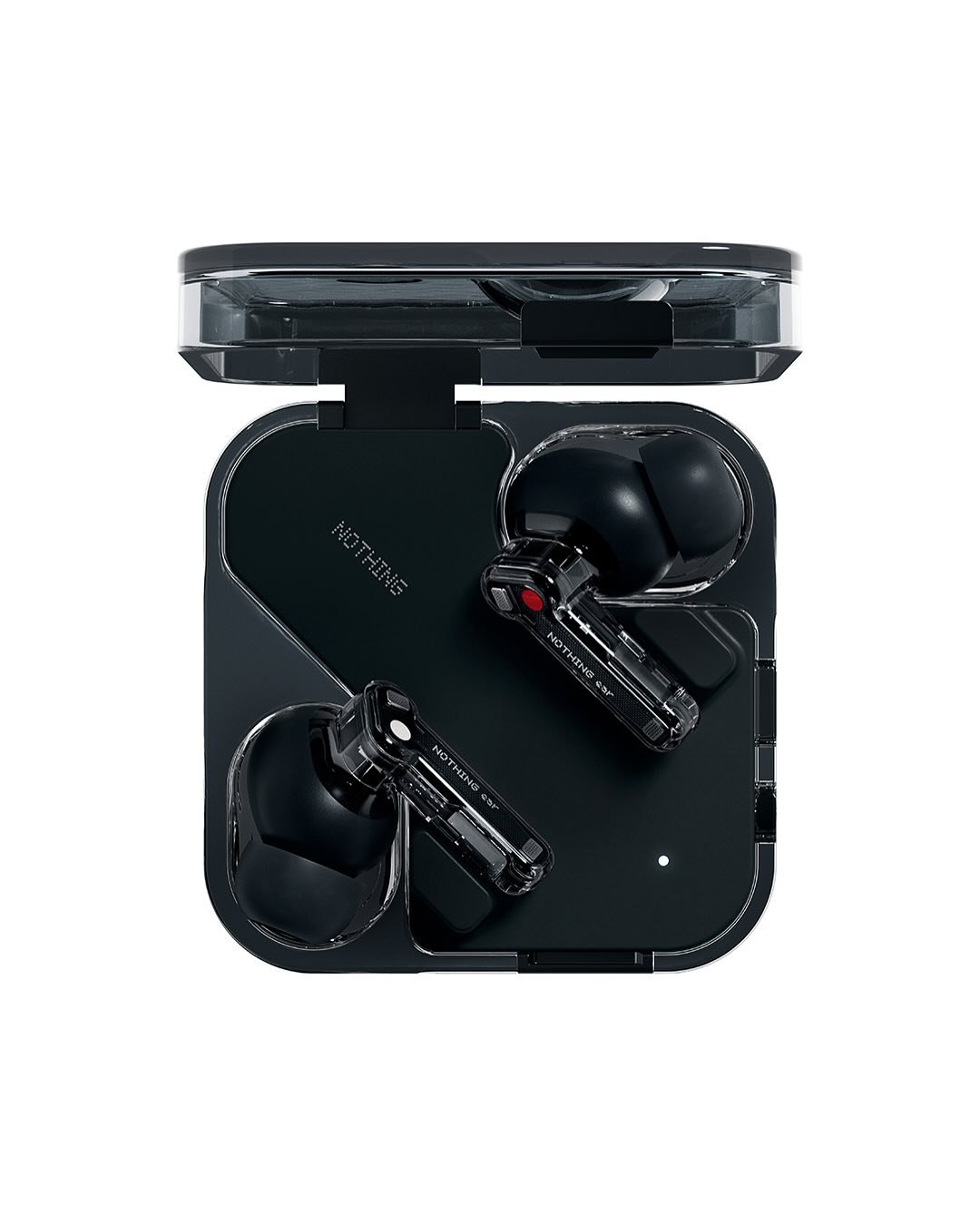
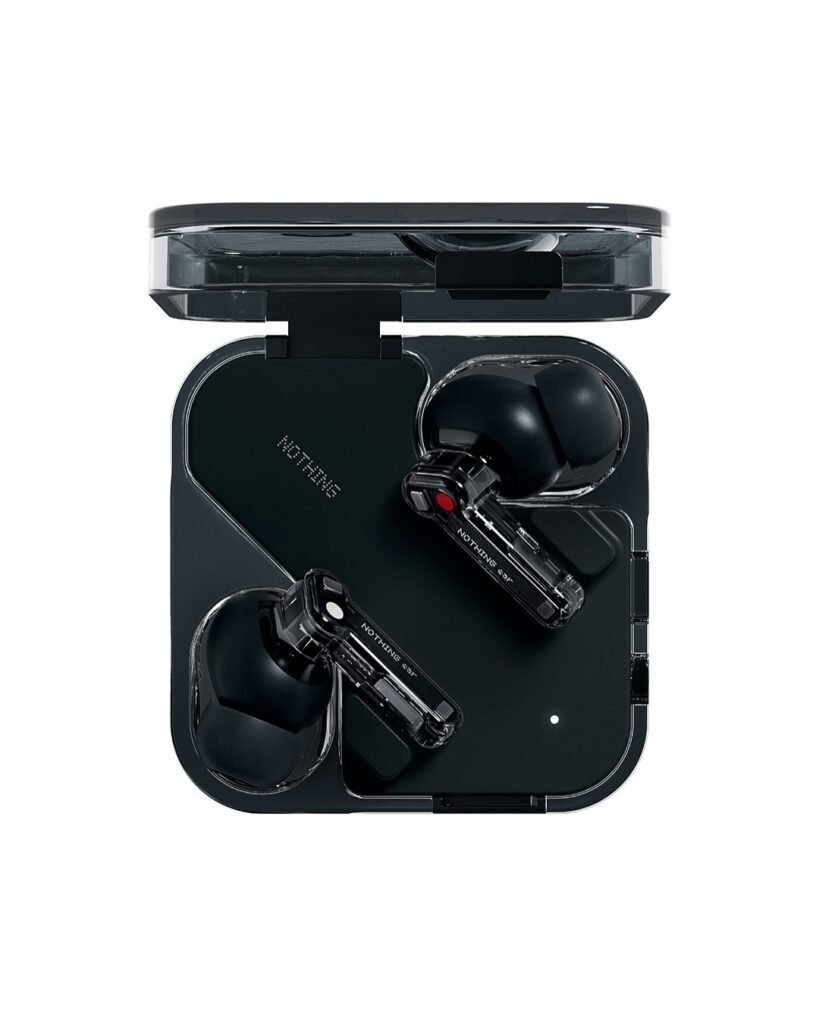
The launch of Nothings Ear is interesting. This is not because it has a codec or a slightly bigger driver. We see these things happen every year with products. The interesting thing, about the Nothings Ear launch is that Nothing is trying to change where your microphone lives. They want to do something with the microphone on the Nothings Ear.
The Ear (3) does something cool. It has a microphone system called the “Super Mic” inside the case that you charge your earbuds in. There is also a TALK button that lets you switch to this microphone. This is an idea because when you are in a loud place the case can be closer to your mouth than the earbuds can. This means the Ear (3) “Super Mic” system can hear your voice clearly and there is less noise, in the background. The Ear (3) “Super Mic” system is really helpful when you are trying to talk to someone in a place. Nothing positions it as a “breakthrough” call/voice-note feature, and claims it can cut through noise “up to 95 dB” in some scenarios.
Below is a lot of information about the Super Mic. This includes what the Super Mic is, why the Super Mic exists and how the Super Mic works when people use it. We will also talk about what the Super Mic’s good, at and where the Super Mic has some problems. Finally we will look at whether the Super Mic’s something that people should care about.
1) What exactly is the “Super Mic” system?
Super Mic is a built-in microphone inside the Ear (3) charging case. When you press the case’s TALK button, you can switch from using the earbuds’ microphones to using the charging case microphone instead. Nothing explicitly says the purpose is clarity: because the case mic can be closer to your mouth, it can deliver “industry-leading” voice clarity (their wording).
On the Ear (3) product page, Nothing describes Super Mic as a dual-microphone system in the case, driven by ambient filtering microphones, designed to focus on your voice and suppress surrounding noise.
So conceptually, think of it like this:
Normal earbuds capture your voice from the earbuds that’re in your ears. This means the earbuds are away from your mouth when they pick up your voice. The voice is captured by the earbuds that’re, inside your ears.
The Ear has a Super Mic that picks up your voice well because it is close, to your mouth. This Super Mic also has a noise filter that helps to get rid of background noise. The Ear Super Mic is designed to capture your voice.
This is really different from what you see in regular earbuds. Most companies think that the best way to make earbuds is to put good microphones right in the earbuds. They add things like microphones that can focus on your voice reduce wind noise and even use your bones to help pick up sound. Some earbuds even use intelligence to reduce background noise.. What if the best microphone is not actually in your ear but somewhere else, like in your pocket or in your hand when you are holding your phone? Earbuds usually have microphones in the earbuds themselves. This idea is saying that earbuds do not have to have the best microphone in the earbuds. The best microphone could be else like in your pocket or, in your hand.
2) Why put a microphone in the case at all?
If you have ever tried taking calls :
traffic or metro stations
crowded markets
college corridors
weddings / DJ speakers
construction noise
windy roads on a bike (even standing nearby)
You already know the problem with those little wireless earbuds. The microphone quality is really bad when it is noisy, around you. The microphone quality of wireless earbuds just does not work well when there is a lot of real noise.
Even with modern “AI noise reduction,” there’s a physics problem:
Your mouth is far from earbud mics.
Background noise can be as loud or louder than your voice at the mic position.
The wind is really bad for those microphone ports. It can totally ruin everything. When the wind blasts into the mic ports it causes a lot of problems. The wind is just not good, for the mic ports at all.
A case mic changes the geometry. If you hold the case near your mouth, your voice becomes louder relative to the environment at the mic. That alone can improve intelligibility even before software filtering. Nothing’s own support page highlights exactly this: closer to the mouth = clearer voice.
3) So I want to know how the Super Mic is actually supposed to work when we use it in life. The Super Mic is something that I’m really curious about. I mean can the Super Mic really do what it says it can do? How does the Super Mic help people in their lives? I want to understand how the Super Mic works in life situations, with the Super Mic.
The basic “call” flow
You are, on a call using Ear (3).
You take the charging case out of something. The charging case is what you are holding now. You have the charging case, in your hand. The charging case is out.
You press TALK to switch the active mic source to the case (Super Mic).
You can hold the case near your mouth. You can put the case in a good spot. The case needs to be, in a position and this has a lot to do with the distance of the case.
The case is able to hear your voice. The earbuds are still good, at listening to things.
This makes a system that is divided into parts. The system is split.
Earbuds = speaker output (and maybe some processing / connection)
Case = voice input (microphone capture)
Tech press coverage also frames it this way: a mic + talk button on the case, designed specifically to improve voice capture.
The recommended distance is really a clue. This distance is something that we should think about. The recommended distance gives us a hint, about what we are trying to figure out. We need to think about the recommended distance.
Nothing really gives us any tips on how to get the results, from it:
< 40 cm from mouth in normal noise
< 5 cm from mouth in loud noise
That basically confirms how the thing is supposed to work: when it is really loud around you you are supposed to hold the case close to you. Almost like you are holding a small microphone in your hand. The case is like a handheld mic that you need to keep close, to your mouth so that it can pick up your voice clearly.
This is why Super Mic is something that people either really like or they do not care about. The Super Mic feature is very useful when you need to use the Super Mic. The thing, about Super Mic is that it is not something that you can easily overlook.
4) Does it really make the call quality better?
People who try it out and share their thoughts usually say that it can be helpful especially when things are really tough. It is not a miracle fix. It also depends on the app or device that Independent people are using.
TechRadar’s early testing describes improved call clarity and explains that it’s designed to filter strong ambient noise, though some differences can be subtle depending on scenario.
The Verge’s hands-on coverage emphasizes that many calls support it, but also highlights limitations for voice notes and some recording situations (details below).
Sound Guys notes it works across many major calling apps (Zoom, Teams, Meet, WhatsApp) but compatibility isn’t universal and the experience varies by use case.
So the realistic answer is:
Best case is when the iPhone case is really helpful. This is what happens: you are in a place with a lot of noise. You can hold the case, near your mouth. You are using a calling app that the case supports. Then people can hear your voice clearly when you talk to them using the case.
The worst case is when you think it will work everywhere like a microphone. You expect to use the microphone for things like voice notes inside every app and for camera recordings and so on.. The microphone will not work that way and you will run into frustrating limitations, with the microphone.
5) The biggest gotcha: app compatibility (and “voice notes” limitations)
This is the point where the Super Mic goes from being really amazing, to making you think wait why not the Super Mic.
Nothing itself warns that Super Mic depends on device/OS/app compatibility and that some use cases may not be supported in all applications.
People who review things are getting more specific. They are looking at the details of the product or service like the features and what it can do. Then they give their opinion on it. The reviewers are being very particular about what they like and what they do not like about the product or service. They are saying exactly what they think. Reviewers are getting really good at pointing out the things that’re good and the things that are bad, about the product or service.. Reviewers get more specific.
The Verge points out you can’t use it for WhatsApp or Snapchat voice notes, and that many Android camera apps won’t let you use an external mic source.
Gizmodo also notes Nothing says it isn’t optimized for certain in-app voice messaging scenarios.
Sound Guys similarly calls out uneven compatibility and that it won’t work with many standard camera apps unless the app supports selecting the microphone.
So you want to know why something happens. Let me try to explain it in terms.
The thing is, when something, like this happens it can be really confusing.
Why does it happen you ask?
Well sometimes things just do not go as planned. That is when this happens.
This thing that happens it is a part of life.
You see, when we do things sometimes the result is not what we expected. That is why this thing happens.
It is like when you do something. It does not work out that is basically what happens when this happens.
So to sum it up this thing that happens it is something that we have to deal with sometimes.
Apps control the input, in different ways:
When we use call apps like Zoom or Meet or Teams they usually take control of the input, on our system. This means they can also work with a microphone that we plug in.
When you use voice notes in messaging apps they might record your voice in a way. They could be using the phones microphone all the time or they might be handling the sound from your Bluetooth headphones differently. Voice notes in messaging apps can be a bit weird like that. They do not always work the way, as other voice recording things on your phone. The voice note features in these messaging apps might even have their special way of capturing your voice.
When you use camera apps on a lot of phones they automatically record the sound from the phones microphone. This is what they do by default. The thing is, some of these apps do not give you the option to choose which microphone you want to use. Camera apps, on phones do this they record video and audio from the phone mic unless they let you pick a different mic, which many camera apps do not do. Camera apps that do not allow mic selection will just use the phone mic.
The Super Mic is really good when you use it for talking to people live. This is what the Super Mic was made for so it works well for live calling. The Super Mic is strongest when you use it to make calls.
6) The Dual Connection is able to have an effect on the Super Mic. This means that the Super Mic and the Dual Connection are connected in such a way that the Dual Connection can impact the Super Mic. The Dual Connection and the Super Mic do not work independently of each other the Dual Connection has an impact, on the Super Mic.
Ear (3) includes “Dual Connection” (connect to two devices). But Nothing explicitly states that turning Dual Connection on can affect Super Mic functionality because only one microphone system can be active at a time, and enabling dual connection can make it take longer for Super Mic to turn on.
In practical terms:
When you use the Super Mic a lot you might like using it in single-device mode because it usually works better that way. The Super Mic will be more reliable when it is, in single-device mode.
When you use two devices, like a laptop and a phone you will probably have to deal with a few problems. Two-device switching, which is using a laptop and a phone can be a bit tricky. You will have to switch between your laptop and your phone. That can cause some extra hassle, with two-device switching.
7) What about voice memos? Is it really a “voice memo mic”?
Nothing markets Super Mic for “calls and voice notes/voicenotes” on the product page.
In the world the voice memo depends on which app you use:
Some native recorder apps (like iOS Voice Memos) can support external mic selection more reliably (as coverage notes).
Some messaging apps’ quick voice notes do not behave the same way (again: WhatsApp/Snapchat voice notes called out).
If you really want the WhatsApp voice notes Super Mic might not be what you are looking for. You want the best WhatsApp voice notes and Super Mic does not give you that.
If you want people to hear you on calls even when you are outside then Super Mic is a good choice. Super Mic is really useful when you need people to hear your voice on calls, even outside.
8) The TALK button is really important because it helps people communicate with each other. The TALK button is something that we should pay attention to. When we use the TALK button it makes a difference. The TALK button is what makes it possible for us to talk to each other. We need to understand why the TALK button matters much. The TALK button is very useful. It is used by many people every day. The main thing about the TALK button is that it allows us to have conversations. The TALK button is important, for people who want to talk to each other.
The TALK button is really important because it makes the Super Mic feel like something you do on purpose than something that just happens. The TALK button makes the Super Mic feel like a mode, not just something that turns on by itself. The Super Mic is more useful when you have to press the TALK button to use it.
Nothing’s support documentation says you switch between the earphones’ mic and the case mic using the TALK button.
Nothing Tech Support
This thing has two points to consider:
You have control, over when the case mic’s used. The case mic is something that you can decide to use at your pace. This means you get to choose when the case mic is used.
Predictability is a thing. You are less likely to use the wrong microphone. This means you will not use the mic by mistake. The microphone you want to use will be the one you actually use.
This also means you have to do something when you are really stressed out. You have to say things, like “hold on I am switching microphones…”
9) Why some people will really like the Super Mic
The Super Mic is something that people are going to like for a lot of reasons.
Some people will love the Super Mic because it has a lot of features.
The Super Mic is a product that people will enjoy using and they will love the Super Mic.
People will like the way the Super Mic works. They will have fun with the Super Mic.
The Super Mic is really great, for people. If you are one of these people the Super Mic is very interesting:
A) People who take calls in noisy places like a busy street or a crowded coffee shop can have a really tough time hearing what the other person is saying. The noise, around them makes it very hard to focus on the call. These people, who take calls in noisy places have to deal with a lot of distractions.
I hate it when I am on sales calls or client calls and I miss something. The same thing happens during interviews. It is really bad when I am doing work while I am commuting. In all these situations if I say “sorry can you repeat” it is expensive for the sales calls and the client calls and the interviews and the remote work. This is because time is money, for the sales calls and the client calls and the interviews and the remote work while commuting.
People who use earbuds see them as a work tool. They think earbuds are very important for their work. Earbuds help them do their job better. For these people earbuds are, like any tool they need to do their work. They use earbuds every day to get things done. Earbuds are a part of their work life.
If you live on Zoom/Meet/Teams and often move around, a “backup mic” can be valuable. Some reviewers mention these major call apps in the compatibility list.
Content creators who make quick stand up audio recordings are very popular. The people who do this kind of thing are often funny. They record themselves talking. People listen to the content creators who do quick stand-up audio. Sometimes the content creators who do stand-up audio are very good, at making people laugh. The content creators who do stand-up audio usually talk about everyday things.
This is not for audio but it is good, for quick street style talk clips if the app you use to record things allows you to pick which microphone to use.
People who really dislike the sound of wind noise they are the ones who hate wind noise. These people who hate wind noise they usually get annoyed by the sound that wind noise makes. For people who hate wind noise this noise is very disturbing.
A case near the mouth can really help reduce how much the wind affects the sound compared to microphones that’re at ear level. This is because the mouth case can block some of the wind.. It still depends on the direction of the wind and the conditions you are in. The case near the mouth can make a difference, in how much the wind dominates the sound.
10) Why some people will ignore this thing or they will get really annoyed with it the thing being talked about here is something that some people just do not care about. That is why they will ignore it but, for others it will be something that gets them really upset and annoyed with the whole situation of this thing.
A) It changes the way you use your wireless headphones. This thing really affects how you listen to music with your wireless headphones. Your true wireless experience is not the same anymore because of it. It is like your true wireless headphones are a part of you and this thing changes that.
Earbuds are supposed to be hands. The thing, with Super Mic earbuds is that you have to hold the case or put it in a position kind of like it is a small microphone. Some people will think that is really awkward when they are using Super Mic earbuds.
B) This thing does not work the way in all the applications. The experience is different when you use apps. This is what I mean by it not being the same everywhere. The application you use will affect how this thing works.
As covered, voice note limitations and camera recording limitations are real.
C) Sometimes it feels like a sales pitch when the earbuds you have now’re good enough. You might think that the new ones are not really necessary. The thing is, your current earbuds are fine so you do not really see a point, in getting ones. This is what happens when your earbuds are good enough.
If you usually take calls inside the microphones, on earbuds work really well. You might never even need to press the TALK button on your earbuds.
11) Ear (3) isn’t only Super Mic: what else is new/important?
So you were asking about the Super Mic. It is also good to look at the whole product. This is because Nothing is selling the Ear (3) as a high end and fancy true wireless earbuds. The company is trying to make the Ear (3) sound, like a good product. Nothing wants people to think that the Ear (3) is a premium product even if it is not top of the line.
Up to 45 dB noise cancelling (claimed maximum)
24-bit Hi-Res LDAC audio support
Listed price in major markets: $179 / £179 / €179 (varies by promos/region)
The features of Super Mic are important because it is what sets it apart. The product also has to be good at sound and noise cancellation, like other earbuds so that people will want to buy it. Super Mic has to be earbuds in terms of sound quality and noise cancellation in addition, to having Super Mic.
12) Price, launch timing, and India context
Global coverage around the launch pegs pricing at $179 and availability rolling out after announcement.
Some India-facing coverage said India availability would follow later (timing depends on retail partners).
If you’re buying from India, check the official Nothing India store page and/or major partners (often Flipkart for Nothing audio listings in India), because prices and bundles can change quickly by sale period.
Thirteen. Here are some practical tips to get the best Super Mic results.
To get the best Super Mic results you should follow these tips.
The Super Mic results will be great if you do these things.
Using the Super Mic is easy when you know these tips.
You will get the best Super Mic results if you practice.
Here are the things you need to do to get good Super Mic results:
* Use the Super Mic in a room
* Hold the Super Mic correctly
* Speak clearly into the Super Mic
The Super Mic is a great tool when you use it correctly.
You can get the best Super Mic results by trying these tips.
Remember to use the Super Mic, in the right way.
This will help you get the best Super Mic results.
The best way to use the Super Mic is to follow these tips.
Getting Super Mic results is easy when you know how.
You can do it if you use the Super Mic the way.
The Super Mic results will be great if you follow these tips.
If you decide to use the Ear feature, which’s number three then these tips are what really make the Ear feature work.
Tip 1: Treat it like a mini handheld mic
In loud places, Nothing’s own guidance says <5 cm from mouth. That’s basically “hold it close.”
Tip 2: Use it mainly for live calls
This is the highest compatibility scenario per multiple hands-on reports.
Tip 3: Know your apps
Test your top 3 apps:
My main app for making calls is usually WhatsApp calling or Meet or Teams. I use these apps a lot for calling. WhatsApp calling is one of my favorites. Meet and Teams are also very useful, for me. I like using these apps because they are easy to use and they work well. My main calling app is WhatsApp. Meet or Teams.
Your main voice recorder
Your main video camera app
You will quickly learn where the Super Mic works and where the Super Mic does not work.
Tip 4: If you are using Dual Connection you should expect that things will work a bit slower or behave in a way when you use Dual Connection.
Nothing explicitly warns about the interaction.
Tip 5: Don’t expect miracles at a distance
The Super Mic is not a microphone that you use to pick up the sound of a room. It is a microphone that you use when you want to be closer to the persons mouth. The distance, between the Super Mic and the persons mouth really matters when you are using the Super Mic.
14) Who should buy the Ear because of the Super Mic? I think people who want the Ear should buy it because of the Super Mic. The Super Mic is a feature of the Ear. So people who like the Super Mic should buy the Ear. The Ear is good because it has the Super Mic.
Buy it for Super Mic if:
You often have to take important calls when you are in noisy places like when you are on the street or in a crowded room and the noise is a big problem for the person, on the other end of the call the important calls.
You do not mind holding the case, near your mouth
Your calling apps work well with it. The calling apps support it well.
Buy it despite Super Mic (i.e., as a bonus) if:
I really want a premium Nothing because it has great sound quality and active noise cancellation, also known as ANC and it supports LDAC. The microphone, on the Nothing earbud is an extra feature that I think is very useful.
Skip it (or at least don’t pay extra just for Super Mic) if:
your main use is voice notes inside messaging apps,
You want to do camera video recording with a microphone on Android without any hassle. You are looking for a way to make camera video recording with an external mic on Android easy. Camera video recording with a microphone, on Android should not be complicated.
You almost never make phone calls outside.
15) The bigger idea is that Nothing is trying out something they are using the case as a tool and this is what the company Nothing is doing with the case, as a tool.
The Super Mic is part of a trend where technology companies are trying to make accessories do a lot more than just charge the Super Mic and other devices. Technology companies are really trying to make these accessories do things. The Super Mic is an example of this trend.
Earbud cases have been passive for years: battery + pairing button.
The case is not really a part of how we communicate. It is a simple thing that has a button and a microphone and a mode switch. The case is really these basic things: a button, a microphone and a mode switch.
Whether other brands copy this depends on one thing: software compatibility getting better across Android/iOS and popular apps. If external mic selection becomes more standard, a case-mic could become genuinely mainstream. Right now, it’s still ahead of the ecosystem.