Daksh Pandey
Nothing OS 4.0 Launch: An In-Depth Analysis of Android 16-Based Upgradation
The Evolving Identity of Nothing OS
Nothing, a consumer tech brand from London, founded by Carl Pei, has been slowly establishing a niche for itself within a very competitive smartphone space. Whether it’s transparent hardware design or a software philosophy of minimalism, Nothing is doing everything to be different, not better. The key area where Nothing is able to establish this difference is Nothing OS, a skin atop Android.
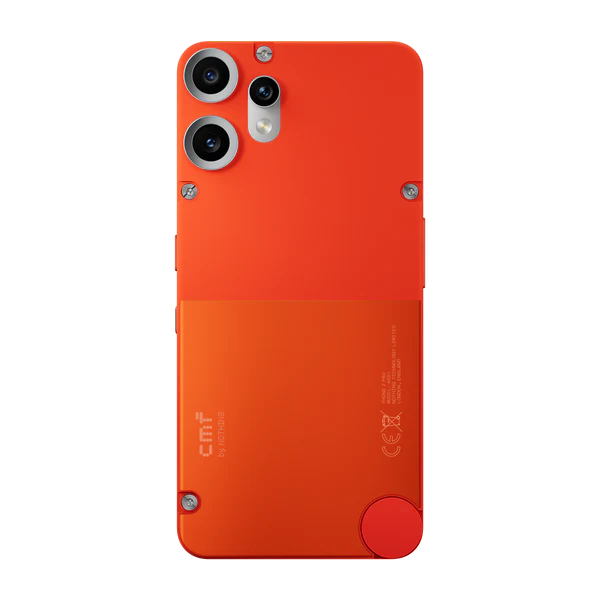
With the launch of Nothing OS 4.0, which is based on Android 16, Nothing is embarking on a new journey of maturity. The launch is not only about making the interface look beautiful but is also about making it perform optimally. The launch has been rolled out on various models such as CMF Phone 1, CMF Phone 2 Pro, and Nothing Phone 3a Lite, which indicates that Nothing is working on making its products look premium as well as budget-friendly.
This write-up will take a closer look at Nothing OS 4.0 in terms of design tenets, Android 16 basis, novel features, optimizations, and the implications of all this for the future of Nothing.
“Understanding Nothing OS: Philosophy Before Features”
Before going further into version 4.0, let’s have a look at what Nothing OS actually stands for:
Core Design Principles for Nothing OS
Nothing OS is based on four key tenets:
Minimalism
- Clean layout
- Less use of elements
- Simple interactions
Consistency
Uniform animations, typography, and system behaviors
“Function over gimmicks – Features that improve daily usability”
Topics will be determined by the
Human-centered design – Interfaces designed to be calming, purposeful, and intuitive
As opposed to highly customized versions of Android like those found on Samsung or Huawei devices, where Google’s original design language is modified in a drastically different way, Nothing OS maintains a very stock look and feel and only adds features with a high degree
Nothing OS 4.0 embodies this same ideology and leverages all that is available in Android 16.
Android 16: The Base for Nothing OS 4.0
Why Android 16 Matters
Android 16 is an important platform release and concentrates on:
Enhanced system efficiency
Improved background process handling
“Improved privacy features”
“Smarter” AI-enabled
Better large screen and multi-device functionality
Nothing OS 4.0 is based solely on these enhancements, which is why most of these improvements are achieved through underlying system changes rather than changes on the UI level.
Enhancements in UI and Design in Nothing OS 4.0
- Enhanced Consistency of the User Interface Throughout the System
Nothing OS 4.0 is all about achieving consistency, both in terms of looks and functionality.
“One of the biggest goals of
What Has Improved
In week
Consistent animation timing in all applications and system menus
Consistent padding, spacing, and alignment
Icon standardization in Quick Settings and notifications
Better transition effects between apps and system UI components.
This provides a much more “premium” experience, even on budget models such as the CMF Phone 1.
- Refined Typography and Visual Hierarchy
Nothing is known for its distinctive dot matrix font, and this is improved in OS 4.0.
Enhanced readability at smaller point sizes
Improved contrast and accessibility
More consistent font size scaling across applications
Cleaner headings and system labels
The upshot is that the interface is very fashionable while still readable.
- Improved Lock Screen and Always-On Display
With Android 16, there are new lock screen APIs, and Nothing OS 4.0 takes advantage of them.
New Lock Screen Options:
Enhanced clock customization
Improving widget location}
Always On Display and Lock Screen transition
More responsive fingerprint animations
It almost feels as though the lock screen is an extension of the home screen.
Performance Enhancements: Speed, Smoothness, and
- Optimized System Animations
It features a major reduction in animation stutter and frame drops in Nothing OS 4.0.
Faster app launch animations
Lower delay in application transitions
More smooth scrolling
Enhanced touch response
These changes are subtle, but you could easily notice these while you are using these tools and
- Enhancements in RAM and Background Applications
Android 16 brings better background process management intelligence, and Nothing OS is built on that foundation.
Improved efficiency by removing unnecessary background tasks
Quick switch back to earlier applications
Reduce memory pressure on devices with constrained RAM
Enhanced multitasking stability
This is even more important for devices such as CMF Phone 1. These devices are primarily targeted at cost-sensitive customers.
- Battery Efficiency Improvements
Rather than concentrating on optimization results in the benchmark world, the original software offering, called the Nothing OS 4.0, aims
Intelligent power management for background applications
Enhanced idle power consumption
More precise information about battery use
Adaptive Performance Scaling
=================
The battery life has also seen improvements, offering longer standby time and screen-on time.
Privacy and Security Enhancements
- Privacy Features in Android 16 Now Implemented in Nothing OS
Nothing OS 4.0 comes bundled with all the essential privacy enhancements introduced by Android 16, including:
Strengthened permission systems
More transparent background location access
Enhanced notification privacy
Improved monitoring of app behavior
Nothing has prevented these factors from being easily understood and not complicated by terms of technology.
- Enhanced App Permission Dashboard
Adding to this, the “permission manager” part of it has also become more defined.
Graphical timelines of when the data was accessed by the apps
Single-Tap Revocation of
More informative alerts for unexpected app activity
This allows users to take control with no expertise in technology.
Device-Specific Optim
CMF Phone 1
The CMF Phone 1 is Nothing’s first device in the ultrapractical smartphone market segment.
Enhancements for Nothing OS 4.0:
Improved performance despite entry-level specifications
Lower system resource usage
Better touch sensitivity
Improved long term behavior
“Nothing OS 4.0 comes with Nothing’s core design values, even for budget users.”
CMF Phone 2 Pro
As a more capable device, the CMF Phone 2 Pro enjoys the following advantages:
Optimized multitasking
Enhanced responsiveness of the camera app
Improved thermal control
Faster UI rendering
Nothing OS 4.0 makes the device feel like it costs a lot more money.
“Nothing OS 4.0
Nothing Phone (3)a Lite
The Nothing Phone 3a Lite is positioned in the mid-range segment.
Primary Advantages:
Balance performance tuning
Optimized camera image processing pipelines
Enhanced gaming stability
Additional refined UI animations
This update brings the Lite model more in line with Nothing’s flagship experience.
Camera Experience Improvements
Although Nothing OS is not a camera-centric version, like other Android skins, version 4.0 of Nothing OS provides several enhancements.
- Quick Camera Start-Up and Capture
Lowered shutter lag
Quick application launch
Enhanced processing speed for HDR
- Better Consistency of Image Processing
Improved color consistency under different light conditions
Less over-shar
Deeper, more natural skin tones
Such enhancements are a result of both the Android 16 camera APIs and the optimizations done by Nothing.
- Audio, Haptic, and Sensory Feedback
- Enhanced Haptic Feedback
Nothing OS 4.0 Enhances Vibration Feedback For:
Typing
Narrative gestures</a
System alerts
Haptics also feel more precise and less obtrusive.
- Audio System Upgrades
Better Stability for Audio Over Bluetooth
Enhanced Volume Quality
Lowered audio latencies in supported apps
This improves both media usage and calls.
Ecosystem Integration and Future-Readiness
Nothing OS 4.0 is made keeping in mind the future.
- Improved Compatibility with Nothing Ecosystem Devices
Enhanced pairing with Nothing Ear and CMF accessories
Unified control panels
Improved device switching functionality
- Preparation for AI and Smart Features
Although Nothing OS 4.0 does not promote the use of AI aggressively, it sets the stage for the following:
Hardware Intelligence
Smarter Suggestions
Context-Aware System Behavior
“The Nothing is the first company to be completely owned and
Stability and Scalability/Usability
Among the most underappreciated facets of Nothing OS 4.0 lies in its stability.
UI crashes caused by random factors have been
Improved system updates
This will ensure
OTA update management improvements
Lower long-term performance degradation
As such, Nothing OS is ideal not only for geeks but also for regular users.
Rollout Strategy and Update Experience
Rollout Strategy
“Nothing is rolling out OS 4.0 on a phased rollout, which is aimed at ensuring
Stability
Hardware-tuning support
Minimal disruption of the users
Rollout will start with supported devices running CMF and Lite. Availability will gradually increase.
Nothing OS 4.0’s Significance for Nothing Brand
Nothing OS 4.0 makes the transition from exploration to optimization.
Key Takeaways:
Nothing about the quality of software, only hardware design
It is focusing on budget and mid-range consumers and not only flagships Consistency and long-term usability: a growing priority In short, this puts Nothing into a serious Android competitor role. Conclusion: A Quiet but Important Upgrade Nothing OS 4.0 Might Not Introduce
The new update in Nothing OS 4.0 might not bring new, attention-grabbing features, but it But with Android 16, improving the consistency of the user interface, optimizing performance, and bringing meaningful upgrades to all segments of devices, Nothing has shown that smart design can make a difference. Nothing OS 4.0 brings Nothing OS to CMF Phone 1, CMF Phone 2 Pro, and Nothing Phone 3a Lite users for a smoother, more reliable, and enjoyable experience, all while retaining the minimalistic identity of the brand. INTERVIEW BY Wendy Alice Sanchez “In a crowded market of feature-laden Android skins, Nothing OS 4.0 distinguishes itself by doing less, yet doing it better.” — Wendy Sanchez